Toyota Prius Cares About Kids - Like on Facebook & They'll Donate to Toys for Tots this Holiday Season

Community

It was a fun, full and informative day at the L.A. Auto Show (which runs November 18-27 at the Los Angeles Convention Center) today.  This was my first day on the job as a mom on the inaugural Toyota Women Influencer Network team (TWIN), along with a handful of other Southern California women bloggers as guests of Toyota. For sure, we learned lots about the new 2012 Camry and Prius models on display at the show and even did some test drives. We also enjoyed an insider's intimate luncheon with some of Toyota's brightest executives in digital marketing. But, even with all that positive energy, I  think the real high point of the day was learning about something really meaningful that Toyota is doing right now that exemplifies caring about people. Since my kids and I have been into community service since they were toddlers I guess I shouldn't be surprised how this inspired me. With Thanksgiving almost here, to help you get into the holiday spirit I thought you'd appreciate knowing about this too.

At the L.A. Auto Show - Prius V Promotes Toys for Tots Project
iPhone Photo by Janis Brett Elspas, MommyBlogExpert.com

The big news is that to celebrate more space in the cargo of their new 2012 Prius V, Toyota has announced they will be donating toys in volume to Toys for Tots to bring holiday cheer to some very deserving children. They're not asking you to give money or toys yourself. Instead, here's how you personally -- via a very unique community social media outreach program -- can make sure that Toyota donates as many toys as possible to this charitable organization by doing three easy tasks that will only take you a few minutes. 
  • First, like the Prius Facebook page
  • Second, go to their Facebook tab “More Prius. More Giving.” choose and click on a toy and the brand will donate it on your behalf! 
  • Most importantly, keep coming back to that tab daily, all season long to select another gift for Toyota to donate each day in your name
If you take the time to do just those little things -- getting three of your friends to do the same all the better-- think of how you'll be able to help make this holiday a whole lot happier and more fun for some pretty awesome boys and girls.

I've already liked the Prius Facebook page and chose a teddy bear for Toyota to donate to Toys for Tots today. How about you? With so much to be thankful for ourselves with Thanksgiving this Thursday, what better time to pay it forward with gratitude by taking part in this Toyota outreach effort?


FTC Disclosure: As stated in this post I am a member of Toyota Women Influencer Network and was hosted by Toyota at the L.A. Auto Show for the event described. In addition, I also received a Toyota logo messenger bag filled with some token items. However, MommyBlogExpert did not receive any payment or other compensation associated with this particular post. See complete FTC Disclosure information that appears at the bottom of MommyBlogExpert's main page and at the bottom of every individual post on this blog, including this one.

How to Make a Unique Old-Fashioned Holiday Gift - A Photo Book of Memories You Digitally Design Yourself

Gifts

If you are looking for an inexpensive and memorable gift that is old-fashioned and modern at the same time, you've come to the right place. That's because for this post I had the opportunity to create a surprise present for my mother: A luxurious leather hardbound Nero Kwik Media photo book. I designed this myself online, starting with color slides that my father took of our family when I was a girl growing up and that my brother converted to CD for me. Having never created a digital photo book before, based on my own experience I think it's likely that you similarly -- with some basic computer skills -- can easily put together a book of your own that might be your the most unforgettable gift you give this holiday season.
My Daddy and me (age 2), 1958 Vintage family photo
This is the picture I chose for my photo book cover

Nero Kwik Media helps you organize all your photos, music, and videos in one place. From editing/enhancing photos and audio & visual material, to generating photo books, greeting cards, slide shows, and more using these different media sources a whole new world is now at your keyboard ready for you to tap into. There's no need to shy away from trying this product yourself because it really is simple to use once you get the hang of it.

Here's, step by step, how I made my book...

First, I set up an account on the Nero Kwik Media site by entering my email address using our family HP Laptop running Microsoft Windows 7

This is a free Windows-PC application with minimum system requirements that include
  • Windows® XP SP3 (32bit), Windows Vista® SP1 or later (32 and 64bit), Windows® 7 Home Premium, Professional or Ultimate (32 and 64bit)
  • 1 GB hard drive space for typical installation that includes templates, content and temporary disk space
  • Microsoft Windows Internet Explorer 7
  • A high speed Internet connection
  • For additional requirements and details, see site
The next step was downloading and installing the Nero Kwik Media application. The product's review guide that I received said it would take about 20 minutes to complete the process. However, I believe it ended up actually taking around an hour to complete this step because we have high speed cable Internet access which is not as fast as DSL. Depending on what kind of Internet service you have this task might take a more or less amount of time than what I experienced.

After the product's icon was on my desktop all I had to do was double click to launch the application. I found it fascinating that the first time you use this the software automatically scans all your user files looking for all photos wherever they may be on your computer and creating a library that you can access completely from within the Nero Kwik Media program. If you also have media on USBs, CDs or DVDs that you'd like to add that wasn't captured in the initial scan like I did, then it just involves a few more clicks to combine these with those that are already on your PC.

I continued through the Getting Started section. First I clicked on the Create Photo Product button, then selected Premium Cover and chose the Leather style in black from a drop-down menu. After that you can either design your own layouts or select a theme from a variety of pre-designed templates for your book. Being a beginner at this, I chose one of Kwik Media's two travel themed sets since I wanted my book to retell the story of how my journey in life began at birth and take my mom on a trip to revisit the first three years after I was born.

Once I figured out how the different functions worked, it took me a total of about 6 hours to go through approximately 60 photos, cropping and resizing each of them individually right in the application. Had I created a traditional scrap book manually with that much material, I'm guessing it would have taken me many more hours to finish.  I fine tuned the templates on each page adding minor details and changing things around just a little. Once the templates pages were laid out as I wanted them, all I had to do was drag and drop each picture into place and also type in text on some of the pages.

I put this book together at more than one sitting, so I really like the fact that my project was automatically saved each time I worked on it to the Nero Kwik Media library on my desktop. In fact, I highly recommend that if you use this, that you also take your time creating your heirloom book by putting it together over a few days time at the minimum to make sure everything is just right. When you're done, you just push the preview button and you can page through the entire book and see exactly how it will look like when its printed in real-life book form. It's smart to check everything carefully to make sure photos are centered inside the templates properly and also proofread any captions. After that, you push the order button. 

Note: I ordered my photo book last Thursday and haven't received it as yet. When it arrives I'll update this post and let you know how it all turned out as well as add some more pictures of some of the pages. In the meantime, I can't wait to see it.


FTC Disclosure: This post is part of a SocialMoms product evaluation, for which I've been selected. One free photo book was available to me for review purposes and I've been paid $100 compensating me for my time.  The opinions expressed in this post are mine and don't necessarily reflect the opinions of SocialMoms or Nero. See complete FTC Disclosure information that appears at the bottom of MommyBlogExpert's main page and at the bottom of every individual post on this blog, including this one.

Easy & Nutritious No-Stick Baked Pasta Casserole Recipe a Dinner Hit With Kids, Moms + GIVEAWAY

Good Food
Plus Pam's Cooking Spray, Hunt's Giveaway, Ends 12/27/11

From Gingerbread Houses to Homemade Cheese Raviolis made with an old-fashioned hand crank pasta machine, readers know that food, fun and kids always go great together -- whether you are cooking or baking for or with your children. So, when I was invited as a mommy blogger to try out and document our family's experiences with the new and improved Pam Cooking Spray, a ConAgra Foods brand, I was excited to participate in the challenge

To put Pam's new formulation to the test, instead of choosing one of the great recipes in the booklet the brand sent me I decided to make my own original Easy Baked Rigatoni pictured below (note: You can make the recipe here with whatever pasta you like). This is definitely kid friendly and a family favorite at our house.
Mommy's Baked Rigatoni
iPhone Photo by Janis Brett Elspas, MommyBlogExpert.com

This dish is unbelievably easy and fast to assemble and bake because it requires just four ingredients: pasta, spaghetti sauce, canned tomatoes, and cheese. It's also smart -- I learned from this experience  -- to add a fifth ingredient that will minimize clean-up later: Pam spray so it doesn't stick to the pan. Believe me, that last little step is going to make it a snap to clean up if your own experience is anything like mine was. Here's my recipe for you to make for your own family.

Baked Rigatoni Casserole
Serves 6

Ingredients
1 lb. box of pasta of your choice
Half jar of your favorite seasoned spaghetti sauce
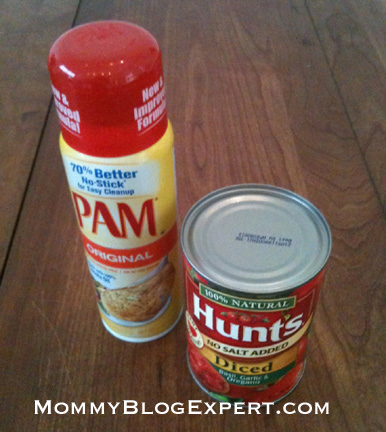
One 14.5 oz can of Hunt's Diced Tomatoes
1 c. shredded low fat mozzarella cheese
Pam Cooking Spray

Before you begin, set out all your ingredients. Prepare a 13 x 9 baking pan or similar size casserole dish by lightly spraying with Pam -- which has no cholesterol and only 1 calorie per 1-second spray. Preheat the oven to 350 degrees

To make the pasta, boil according to directions on the package box, drain well.

Carefully transfer hot, cooked pasta to your baking dish. In a separate bowl mix the canned tomatoes with a half jar of sauce (approximately 1 cup), then spoon this mixture over the top of the pasta.

Cover with foil and bake for about 20 minutes. When time is up, take the casserole dish out of the oven and remove the foil. Scatter the shredded cheese evenly over the top and return to the oven to finish baking, uncovered, until the cheese melts (about 8-10 minutes).
L to R: Before, during, and after the MBE Pam Cooking Spray Test
iPhone by Janis Brett Elspas, MommyBlogExpert.com

Serve with a fresh green salad and enjoy. It's really that easy to make, eat and clean up!

Pam Cooking Spray and Hunt's Tomatoes are brands owned by ConAgra Foods.


Pam Cooking Spray & Hunt's Brands 
GIVEAWAY
Ends 12/27/11

iPhone Photo by Janis Brett Elspas, MommyBlogExpert.com

HOW TO ENTER

Enter for your chance to WIN your own Pam Cooking Spray package that includes coupons good for one free can of Hunt's Tomatoes and one can of Pam Cooking Spray plus a step-by-step guide for the Ultimate Pam Challenge featuring recipe cards.

Contest ends December 27, 2011 and is open to legal residents of the U.S. only. One winner will be selected at random from all entries received and will be notified via Direct Mail to your Twitter address.

Required (Mandatory) Entry
Simply Tweet a picture of your favorite recipe that you've made using Pam being sure to include the hash tag #PAMGIVEAWAY and @MommyBlogExpert in the actual Tweet so its searchable. Then, leave a comment below this post to confirm that you've tweeted.

Additional Extra Entries
Get extra entries to win for doing any combination of the easy options listed below.  Just be sure to return to MommyBlogExpert (MBE) to leave an additional comment after each individual extra action you do to confirm these so we can record all your extra chances to win.  Don't forget to include your email address, Facebook or Twitter contact info in the comment section so the winner can be contacted.

1. Follow MBE on Twitter
2. Like MBE on Facebook
3. Subscribe to MommyBlogExpert
4. Like Pam Cooking Spray on Facebook

LOTS More 
Family-Friendly Giveaways!
Currently Being Hosted by Mommy Blog Expert
ENTER Them All HERE
FTC Disclosure: I received vouchers for products from the brands mentioned to facilitate this review as part of the Smiley360 network. Also, this post automatically enters me and other selected participants who post into a giveaway just for bloggers.  However, MommyBlogExpert did not receive any payment or other compensation associated with this post. See complete FTC Disclosure information that appears at the bottom of MommyBlogExpert's main page and at the bottom of every individual post on this blog, including this one.
Kids GIVEAWAY Storm Wrangler Young Children's Hardcover Picture Book, Ends 12/14

GIVEAWAY
Ends 12/14

Representatives from virtually every major and independent publishing house constantly submit new fiction and non-fiction books for children and adults to this mommy blog for review. Since -- due to time limitations -- I simply can't do in-depth reviews on every title that crosses my desk, I must be selective. One such fine family friendly piece of literature just reviewed on Mommy Blog Expert is Storm Wrangler by Coert Vorhees (November 2011, $16.95, Bright Sky Press). This is a charming illustrated story that helps kids better understand their weather worries, helping to overcome irrational childhood fears. I'm excited to announce that the publisher is providing this wonderful hard cover book for a giveaway and you can win it. See details below to enter.
Storm Wrangler Book Giveaway
iPhone photo by Janis Brett Elspas, MommyBlogExpert.com


Storm Wrangler
Hardcover Kids Picture Book
GIVEAWAY
Ends December 14, 2011

HOW TO ENTER


Leave a comment(s) below this post.  Contest ends December 14, 2011 at 12 midnite PST and is open to legal residents of the U.S. only. One winner will be selected at random from all entries received and will be notified via email.

Required (Mandatory) Entry
Simply leave a comment below this blogpost saying why you'd like to win this prize.  Don't forget to include your email address, Facebook or Twitter contact info in the comment section so the winner can be contacted.

Additional Extra Entries
Get extra entries to win for doing any combination of the easy options listed below.  Just be sure to return to MommyBlogExpert (MBE) to leave an additional comment after each individual extra action you do to confirm so we can record all your extra chances to win.

1. Follow MBE on Twitter
2. Like MBE on Facebook
3. Subscribe to MommyBlogExpert

Super ***Bonus Entries***
You can earn even MORE chances to win each time you TWEET the message below, up to 3 times each day until the contest ends. 
Don't forget to return to leave a comment on this post with the direct link right after every Tweet you do so you'll receive an entry for each of your RTs.

Tweet:
Storm Wrangler Kids Hardcover Book GIVEAWAY Helps children understand, fear severe weather less http://tinyurl.com/76dy3mc RT 2 #WIN


LOTS More 
Family-Friendly Giveaways!
Currently Being Hosted by Mommy Blog Expert
ENTER Them All HERE

FTC Disclosure: The publisher provided Storm Wrangler to facilitate the book review mentioned and is providing a second copy of the title for this giveaway. However, MommyBlogExpert did not receive any payment or other compensation associated with this post. See complete FTC Disclosure information that appears at the bottom of MommyBlogExpert's main page and at the bottom of every individual post on this blog, including this one.

Bing Travel How to Save on Family Airfare

Travel

Saving When Flying with Kids During Holidays


With Thanksgiving just around the corner and the Christmas, Hanukkah, Kwanzaa and New Years holiday celebrations blowing right in behind, chances are good that your family or someone you know will be traveling this season. These days with the economy still stuck in first gear, saving money by making frugal decisions even on extras like trips and vacations are the norm, especially for moms and dads traveling with children. So it's refreshing to hear some upbeat news to maintain the holiday spirit that I'd like to share with you.


My Frequent Flier 10-month Toddler


Predicting a bit of holiday cheer for travelers -- particularly families with kids creating multiple expenses -- the Fareologists at Bing Travel have issued their preliminary forecast for the 2011 holiday travel season. Here's the good part: Bing expects domestic airfare and hotel room prices to drop slightly this winter translating into consumer savings.

According to Bing Travel
  • Compared to 2010, domestic airfare is expected to be down 1.4% overall
  • Plane tickets will average about $302 this season, as opposed to $306 last holiday
  • Hotel seasonal costs appear to be staying virtually flat for three- and four-star hotels, but five-star hotels are down 8% from last year

“Given this summer’s sharp airfare and hotel increases, it’s a relief to see travel prices normalize, even going down in many cases this holiday,” says Kari Dilloo of Bing Travel who is also the mother of twin toddlers.

“Travelers looking to stay in the U.S. are likely to find some great trip deals this holiday especially if they plan ahead, Dilloo explains."When you are traveling with parents plus multiple kids smart travel buying can amount to spending hundreds of dollars less on your holiday or vacation expenses."

While the overall travel forecast is looking merrier and somewhat brighter this season, the biggest savings lie in the hands of those willing to let the destination and date dictate your holiday travel plans. In fact, Dilloo points out that a traditional white Christmas might not be available in Florida, but getaways to the Sunshine State and other warm-weather destinations are extra cheap this holiday season. Some examples: airfares to Fort Lauderdale, FL, are down 21% from last year and hotels in Las Vegas are down almost 16% this year.

How Bing Travel Can Help

The free tools and tips that  Microsoft Bing Travel offers are just what moms and dads traveling with children need to save time and money when shopping for and booking holiday trips. That's where Bing's Price Predictor comes in: it's an invaluable airfare prediction tool that shows whether the lowest fares appear to be rising or dropping and provides recommendations on whether to buy now or wait.

Tapping its proprietary technology, the Bing Travel site has the ability to analyze 225+ billion airfare observations. The result is that they can provide recommendations with a level of confidence and also give you a feel for expected price increases or decreases over the next seven days.

Similarly, their Hotel Rate Indicator helps traveling consumers find out at a glance if the offered room charge for a hotel is a good deal, based on historical rates. This price indicator is unique to Bing Travel and is available for more than 5,000 hotels in 30 major cities across the U.S. and applies to reservations up to 90 days in the future.

Bing, representing a new generation of search -- was developed to deliver results in a visually stunning way that makes it easy for users to find the information they need. Designed with today’s searchers in mind, Bing, a Microsoft company, provides intelligent tools to simplify tasks and help people make faster and better decisions.

Feel free to share your own experiences about shopping airfares and hotel rooms for your family.  Also, if you've tried Bing Travel, what do think of this relatively new service so far?


FTC Disclosure: See complete FTC Disclosure information that appears at the bottom of MommyBlogExpert's main page and at the bottom of every individual post on this blog, including this one.